TensorFlow Introduction

TensorFlow is open source library by Google for Deep Learning and a Tensor is a multi-dimensional data node having the following three parts:
- Name
- Shape
- Data type
Tensor("Const:0", shape=(), dtype=string)
TensorFlow Hello World example:
First use the following command to install TensorFlow on Windows:
pip3 install --upgrade tensorflow
import tensorflow as tf

hello = tf.constant('Hello World')

print(hello)
If you execute the above program, the text will not be printed. Instead the program will return only a Tensor object back. This is because in TensorFlow we have to follow the given two steps:
- Build the computation graph
- Execute the graph
Lets take a look at how we build the graph of adding two numbers.
import tensorflow as tf

a = tf.constant([1.1], name='a', dtype=tf.float32)

b = tf.constant([2.2], name='b', dtype=tf.float32)

c = tf.add(a, b, name='c', dtype=tf.float32)
In the above example we have built the following graph.
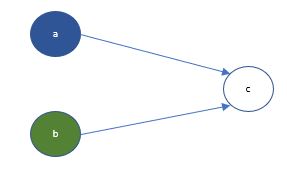
Note, if during a Jupyter session you want to start with another new graph, use the following command to clear the existing graph you have built in the session.
tf.reset_default_graph()
Now the graph is executed which needs a TensorFlow session.
By running a session we specify the program to start using the computing resources.
with tf.Session() as sess:

print(sess.run(c))
To execute the graph node ‘c’, the preceding nodes i.e. ‘a’ and ‘b’ will also be executed. This would print back the result 3.3
Note the use of ‘with’ keyword. This would ensure that as soon as the ‘with’ block is completed, the session is closed and the computing resources are freed.
Instead if you declare the session in a variable and call the run() method on the variable, you will need to explicitly close the session by calling the close() command.
Other commonly used TensorFlow operations:
- tf.constant(): Value does not change during execution
- tf.Variable(): Value can change during execution
- tf.placeholder(): Value is provided during execution
Now lets take an example of a simple equation to understand the execution steps.
y = w1x1 + w2x2 + b
The Tensors for the equation will be defined as
- x1 and x2 are features defined as placeholders so that they are not bound to a hard-coded input data
- ‘y’ is the prediction again defined as placeholder as with new input dataset we will have new output dataset
- w1 and w2 are the weights and ‘b’ is the bias defined as variables as within same execution their values will be adjusted multiple times
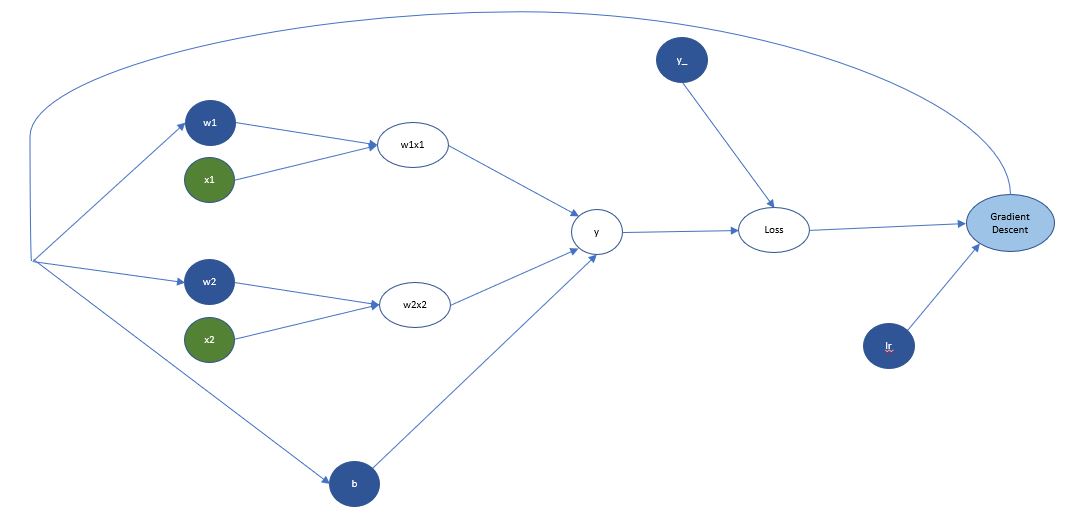
After calculating the predicted value ‘y’ it is compared against the actual value ‘y_’ using a loss function. Then using a defined learning rate ‘lr’ the weights and bias are adjusted to reduce the overall loss of the graph execution. The iterative process of adjusting learning rate based on the loss function is called Gradient Descent.
The above example has only one layer of weights between input and output layers so direction of propagation may not be visibly obvious. The propagation happens first to the nth layer which is last layer before the output, then weights of ‘n-1’th layer are adjusted and so on till it reaches the first layer of weights from the input layer i.e. the input Tensors. This process of traversing back from the predicted value to the preceding layers of weights is known as backpropagation.
Refer to the following code for a basic regression program to predict Boston housing prices.
To visualize a neural network use the TensorBoard tool which will make it easier to debug and understand the graph. Refer to the official documentation for more details.
One thing to note here is that the equation discussed earlier will give you a final value which will work for regression use cases but what if you need to solve a classification problem. In such cases a multi-class classification function like Softmax is used which splits the final outcome probability between 0 and 1 for all the classes such that the final total of all output is 1. Then using a argmax function you can identify the class whose probability is highest and that would be your predicted target value.